🕒 TimeParents v1.2.0 — Windows Game Time Management Tool for Kids
Kids love games like Roblox and Minecraft these days.
They’re fun, but managing how long they play is never easy.
I tried many different programs to control game time, but most of them had issues:
- Missing essential features
- Failing to detect games properly
- Annoying ads
- No password protection
- Poor statistics or no tracking at all
After trying several tools, I finally thought:
“I’ll just build one myself.”
That’s how TimeParents v1.2.0 was created.
It focuses only on the features parents truly need and provides a clean, efficient Windows-only solution for managing game usage time.
It detects when a game is running → manages play time → automatically shuts down/logs off → records usage statistics.
A complete smart management tool designed for real-life parenting.
⭐ Key Features of TimeParents
✅ 1. Three Timer Modes to Match Your Child’s Situation
TimeParents offers three timer modes, each tailored to a specific need.
🔹 Specific Game Mode
- Detects a specific game process (e.g., Roblox)
- Time decreases only while the game is running
- When time is up → Auto shutdown or logoff
🔹 Countdown Mode
Perfect for: “You can play for 1 hour.”
Set a time → PC shuts down/logs off when time expires.
🔹 Specific Time Mode
Useful for setting rules like:
“The computer must shut down at 10 PM.”
Includes an intuitive time picker (🕐) for easy selection.
📊 2. Usage Statistics Based on Real Data
TimeParents doesn’t just limit time—it provides insights.
- Daily usage summary
- Weekly usage graph for the past 7 days
- Detailed logs (date / mode / usage time)
- Password required to access statistics
🎨 3. User-Friendly UI Features
TimeParents aims to be simple and convenient:
- Dark / Light theme
- Full Korean & English support
- Auto-save for all settings
- Pre-shutdown warning alerts
- Timer continues running in the background even when the window is closed
🔐 4. Strong Security Protection
To prevent children from stopping or altering the timer:
- Password required for any setting changes
- Password required to stop the timer
- Password stored securely using SHA-256 hashing
🚀 How to Use
🟦 Run Without Installation (Recommended)
Simply open TimeParents.exe from the dist folder.
No Python installation is required.
📖 User Guide
🔑 Initial Setup

At first launch, set a password.
This password protects both settings and access to statistics.
🎮 How to Use Specific Game Mode

- Select the Specific Game tab
- Set allowed play time
- Enter the process name (e.g., Roblox)
- Choose shutdown or logoff
- Click Start Timer
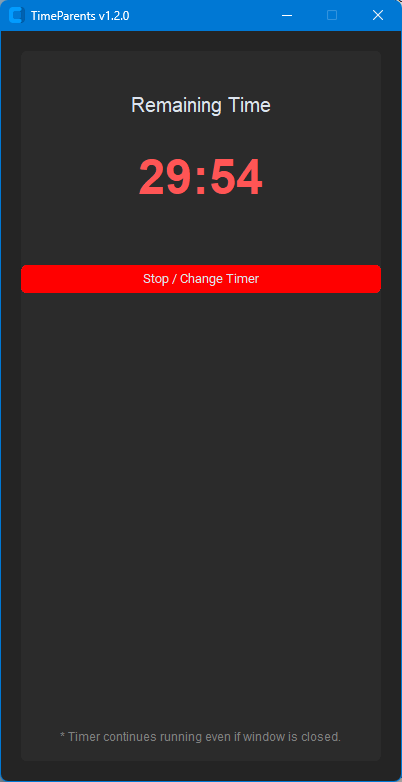
Important: Time only decreases while the game is actually running.
⏱️ Countdown Mode
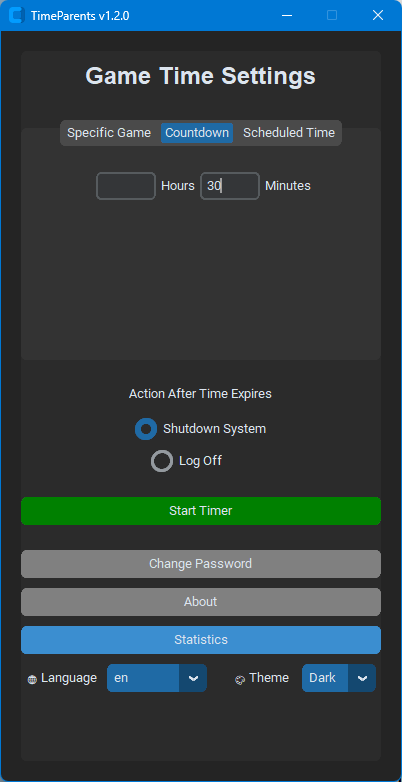
Just set the desired time and start.
🕐 Specific Time Mode

Choose the shutdown time using the intuitive time picker.
📊 Viewing Statistics
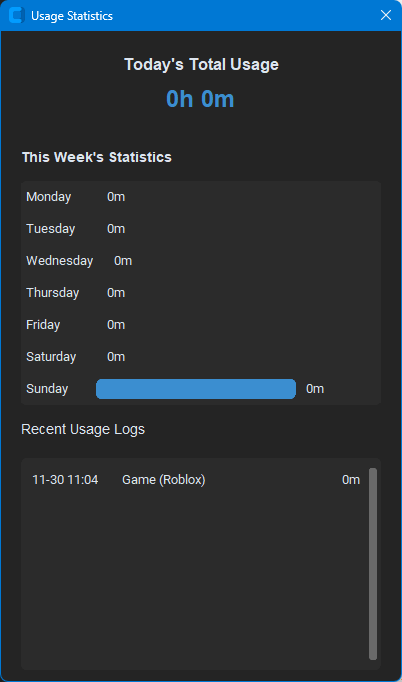
Main screen → View Statistics → Enter password → Done
🎨 Theme & 🌐 Language
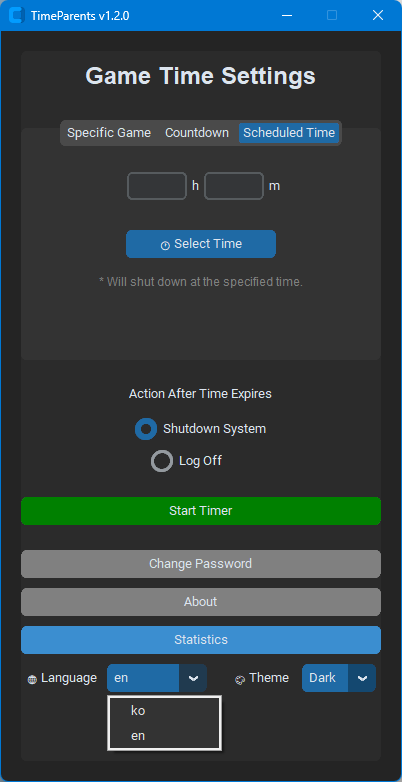
Change anytime from the bottom menu.
🛠️ Development Info (For Tech Enthusiasts)
Tech Stack:
- Python 3.x
- CustomTkinter UI
- Background timers via Threading
- Subprocess-based game detection
- Packaged using PyInstaller
⚠️ Important Notes
- Auto shutdown/logoff may require administrator privileges
- Game detection requires the exact process name
- If you forget your password: delete password.json to reset
- All user settings are stored in settings.json
- If antivirus or security programs (Windows Defender, ALYac, etc.) are installed:
→ You may need to allow the program on first launch
Custom-built executables are often blocked by default, even when safe.
🤝 Contributions & Feedback Welcome
TimeParents is free to use for personal and educational purposes.
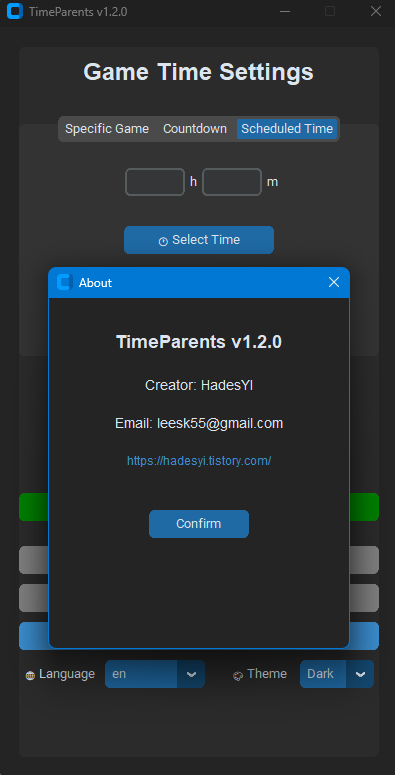
Bug reports and feature suggestions are always welcome!
📧 Email: leesk55@gmail.com
🧑💻 Final Thoughts
TimeParents v1.2.0 is more than just a timer —
it’s a smart tool that helps guide your child toward healthier gaming habits.
Designed with essential features only, simple to operate, and secure enough to prevent tampering — it’s a practical solution for parents looking to manage screen time effectively.
If you want structured, reliable game time management for your children,
TimeParents is absolutely worth trying.
'AI 기반 자동매매 & 금융데이터 분석' 카테고리의 다른 글
| 5편. 실시간 자동매매 시스템 구축 — FastAPI · vLLM · 전략 Executor 설계 (0) | 2025.12.05 |
|---|---|
| 4편. ML + LLM 기반 시그널 생성 실험기 — 모델 학습·검증·운영 파이프라인 (0) | 2025.12.05 |
| 3편. 백테스트 시스템 만들기 — 실전급 백테스트 엔진 설계와 구현 (0) | 2025.12.05 |
| 2편. 감성 분석 기반 시그널 실험 — 뉴스·트위터·리포트로 투자심리 점수 만들기 (0) | 2025.12.05 |
| 1편. 국내/미국 주식 데이터 수집 자동화 실전 가이드 (0) | 2025.12.05 |


